How to Write Colored Text in Discord (Easy 2026 Guide)
· 7 min read
You can write colored text in Discord, even though there's no color button anywhere in the app. The trick is a special code block called ANSI, which lets you paint words red, green, blue, yellow and more, right inside a normal message.
If you've ever seen someone post a bright red warning or a rainbow-style announcement in a server, this is how they did it. In this guide you'll learn exactly how ANSI works, get a full color chart, and copy ready-made examples you can paste straight into Discord.
Want to skip the codes? Jump to the copy-paste examples. Every one has a copy button that includes the hidden escape character, so it works the moment you paste it.
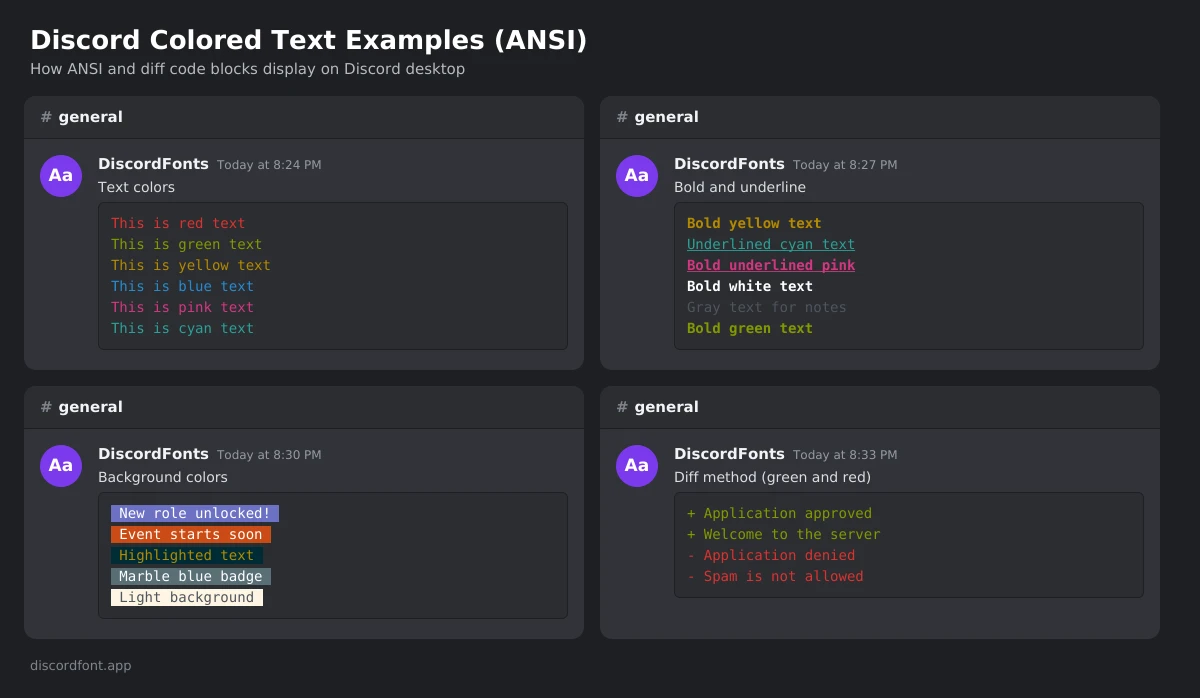
How colored text in Discord works
Discord uses Markdown for formatting. Wrapping text in three backticks (```) creates a code block, and adding a language name after the backticks tells Discord how to highlight it. When that language is ansi, Discord reads special color instructions inside the block and shows your text in color.
Every color instruction has the same shape:
[ESC][FORMAT;COLORm
- ESC is an invisible “escape” character (Unicode U+001B). You can't type it on a normal keyboard, which is why most people copy it from an example.
- FORMAT is a number for style: 0 = normal, 1 = bold, 4 = underline.
- COLOR is a number from 30 to 37 for text color, or 40 to 47 for background color.
- m closes the instruction. Everything after it takes the new color until you change it or reset it with
[ESC][0m.
So [ESC][1;31m means “bold red”, and [ESC][0;34m means “normal blue”.
How to write colored text in Discord, step by step
- Open a message box in any server channel or DM on Discord desktop or in your browser.
- Start an ANSI code block. Type three backticks followed by
ansi, then press Shift + Enter to go to a new line. - Add a color code. Paste the escape character followed by your format and color, for example
[ESC][1;32mfor bold green. - Type your text right after the
m. - Reset the color (optional). Add
[ESC][0mbefore any text you want back in the default color. - Close the code block with three more backticks on a new line, then press Enter to send.
Your finished message looks like this before you send it:
```ansi
ESC[1;32mThis text is bold green
```
The fastest way to get the escape character is to hit Copy on any example in this article, then change the words to your own.
Discord ANSI color codes chart
Discord supports 8 text colors, 8 background colors and 3 formats. Mix them freely, separated by semicolons.
Text colors
| Code | Color | Example |
|---|---|---|
| 30 | Gray | [ESC][0;30m |
| 31 | Red | [ESC][0;31m |
| 32 | Green | [ESC][0;32m |
| 33 | Yellow | [ESC][0;33m |
| 34 | Blue | [ESC][0;34m |
| 35 | Pink | [ESC][0;35m |
| 36 | Cyan | [ESC][0;36m |
| 37 | White | [ESC][0;37m |
Background colors
| Code | Color | Example |
|---|---|---|
| 40 | Firefly dark blue | [ESC][0;40m |
| 41 | Orange | [ESC][0;41m |
| 42 | Marble blue | [ESC][0;42m |
| 43 | Greyish turquoise | [ESC][0;43m |
| 44 | Gray | [ESC][0;44m |
| 45 | Indigo | [ESC][0;45m |
| 46 | Light gray | [ESC][0;46m |
| 47 | White | [ESC][0;47m |
Formats
| Code | Effect |
|---|---|
| 0 | Normal (also resets everything) |
| 1 | Bold |
| 4 | Underline |
To combine all three, list them in one instruction. For example, [ESC][1;4;33;40m gives bold, underlined yellow text on a dark blue background.
Copy-paste colored text examples
Hit Copy on any block below, paste it into Discord, and change the words to your own. The hidden escape character comes along with it.
Red warning message
```ansi
ESC[1;31mWARNING: Read the rules before posting!
```
Server announcement with mixed colors
```ansi
ESC[1;33mANNOUNCEMENTESC[0m
ESC[0;37mGame night starts at ESC[1;32m8 PMESC[0;37m this Friday.
```
Highlighted text with a background
```ansi
ESC[0;37;45m New role unlocked! ESC[0m
```
Rainbow-style text
```ansi
ESC[0;31mRESC[0;33mAESC[0;32mIESC[0;36mNESC[0;34mBESC[0;35mOESC[0;31mW
```
Bold underlined heading
```ansi
ESC[1;4;36mServer Rules
```
Other ways to color text in Discord
Before ANSI support, people used programming-language syntax highlighting to fake colors. A few of these tricks still work, but they're limited and less predictable.
| Method | How to use it | Color you get | Reliability |
|---|---|---|---|
| ANSI | ```ansi + color codes | Any of 8 text and 8 background colors | Best, works on desktop and web |
| Diff | ```diff and start a line with + or - | Green (+) or red (-) | Good, works on most devices |
| Fix | ```fix | Yellow | Inconsistent |
| CSS / YAML / INI tricks | Language-specific symbols | Varies | Often broken by Discord updates |
The diff method is handy for quick green or red lines:
```diff
+ Approved
- Denied
```
For anything more colorful, ANSI is the only method Discord officially supports.
Does colored text work on Discord mobile?
Mostly no. ANSI colors display on Discord desktop and in the browser, but the iPhone and Android apps usually show the text in a plain gray code block. Your message still sends, and anyone on desktop will see the colors.
You can still send colored text from your phone: open this page, copy a finished example, paste it into Discord, and send. Desktop users will see it in full color.
Why your colored text isn't showing
| Problem | Fix |
|---|---|
You see [0;31m as plain text | The escape character is missing. Copy an example instead of typing [ESC]. |
| The whole block is gray | Check you wrote ansi right after the opening backticks, with no space. |
| Colors run into the next line | Add a reset code [ESC][0m where the color should stop. |
| Nothing is colored on your phone | Mobile apps don't render ANSI yet. Check on desktop. |
| You want colored text in your name | Not possible. ANSI only works in messages. Use fancy fonts for names instead. |
For names, bios and server names, see our guide on how to change your font on Discord.
FAQ
Can you change text color in Discord without code?
Not inside Discord itself. The easiest no-code option is to copy one of the ready-made examples in this guide, swap in your own words, and paste it into Discord.
How do I make red text in Discord?
Use an ANSI code block with color code 31, like [ESC][0;31mYour text, or start a line with a minus sign (-) inside a diff code block.
Can I use custom hex colors like #FF5733?
No. Discord's ANSI support is limited to the 8 text colors and 8 background colors in the chart above.
Does colored text work in usernames or channel names?
No. ANSI colors only work inside code blocks in messages. Usernames, display names and channel names don't support color, but you can still style them with Unicode fonts.
Can I get banned for using colored text?
No. ANSI code blocks are a built-in Discord feature. Just follow each server's rules about spam and formatting.
Conclusion
Colored text is one of the easiest ways to make your Discord messages stand out. Remember the formula: an ansi code block, the escape character, a format and color number, then your text. Bookmark the color chart above, or just come back and copy one of the examples whenever you need a colorful message in seconds.