What Is a Discord Timestamp?
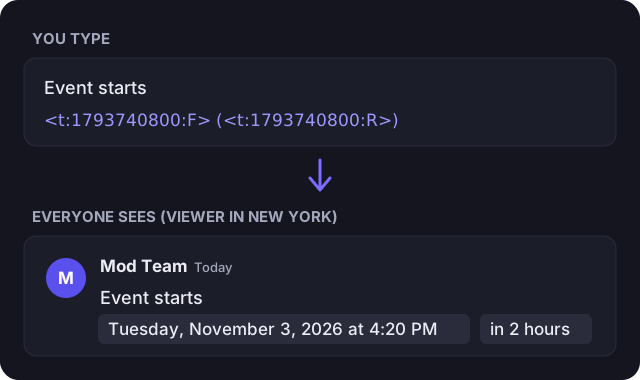
A Discord timestamp is a small piece of code that Discord turns into a date or time when you send a message. You write something like <t:1793740800:F>, and readers see a proper date, such as “Tuesday, November 3, 2026 at 4:20 PM”.
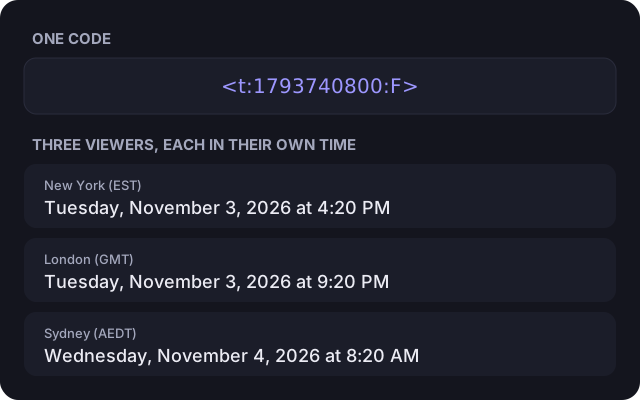
The number in the code is a Unix timestamp: one exact moment, not a time on a particular clock. Each person’s Discord app shows that moment in their own time zone and language. Someone in New York, a friend in London and a teammate in Sydney all read the correct local time from the same message, so nobody has to work out the difference, and nobody turns up an hour late.
How to Use the Discord Timestamp Generator
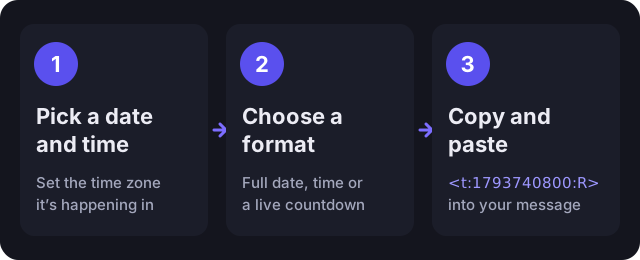
- Choose the date and time of your event, or press Now to start from the current time.
- Check the time zone. It starts as yours; change it if the event is set in another zone, such as a tournament in Eastern Time.
- Fine-tune with the +15 min, +1 hour, +1 day and +1 week buttons if you like.
- Find the format you want in the list and press Copy.
- Paste the code into your Discord message and send it.
Already have a Unix timestamp? Paste it into the Unix field and the generator loads it, whether it’s in seconds or milliseconds. That also makes this a quick Discord time converter in reverse.
Discord Timestamp Formats Explained
The letter at the end of the code sets the Discord time format. There are nine styles. If you leave the letter out, Discord uses f. The examples in the table come from Discord’s documentation; your readers see each style in their own language and clock format.
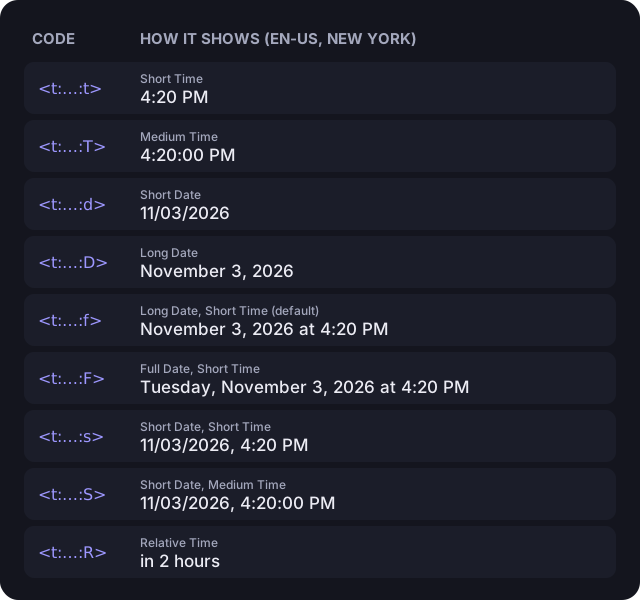
| Style | Code | Example | Best for |
|---|---|---|---|
| Short Time | <t:…:t> | 16:20 | Daily reminders and times on the same day |
| Medium Time | <t:…:T> | 16:20:30 | When the exact second matters |
| Short Date | <t:…:d> | 20/04/2021 | Compact dates in lists and tables |
| Long Date | <t:…:D> | April 20, 2021 | Deadlines and dates without a time |
| Long Date, Short Time | <t:…:f> | April 20, 2021 at 16:20 | The default; good for most announcements |
| Full Date, Short Time | <t:…:F> | Tuesday, April 20, 2021 at 16:20 | Events, where the weekday helps |
| Short Date, Short Time | <t:…:s> | 20/04/2021, 16:20 | Schedules and logs that need to stay short |
| Short Date, Medium Time | <t:…:S> | 20/04/2021, 16:20:30 | Logs and records down to the second |
| Relative Time | <t:…:R> | 4 years ago | Countdowns and “how long ago” |
As a rule of thumb: use Relative (R) for a Discord countdown timestamp, Full Date (F) for events where the weekday matters, and Short Time (t) for daily reminders like “reset at 4:20 PM”.
How to Write a Discord Timestamp Manually
You don’t need a generator if you have the Unix time. The format is <t:UNIX:STYLE>: a lowercase t, a colon, the Unix timestamp in seconds, another colon and the style letter, all inside angle brackets with no spaces. <t:1793740800:R> is a valid example, and so is <t:1793740800> without a style.
To get a Unix timestamp, use this generator, run date +%s in a macOS or Linux terminal, or use Math.floor(Date.now() / 1000) in JavaScript. Many tools give milliseconds (13 digits); Discord needs seconds (10 digits for current dates), so drop the last three digits.
Practical Examples
- Event announcements: “Movie night starts
<t:1793740800:F>(<t:1793740800:R>)” gives the full date and a live countdown. - Giveaways: “Giveaway ends
<t:1793740800:R>” shows how long is left, and switches to “ago” once it’s over. - Raids and matches: “Raid at
<t:1793740800:t>” keeps a daily time short and correct for every player. - Server rules and notices: “Rules updated
<t:1793740800:D>” records the date without a time. - Stream schedules: list each stream with
<t:…:s>for a compact date and time per line.
Every Viewer Sees Their Own Time
Because the code stores a single moment, the same message reads correctly around the world. Pick the time zone the event is planned in, and Discord does the conversion for everyone else.
Common Problems
- It shows as plain text. Check the syntax: it must start with a lowercase
<t:, the style must be one of the nine letters (they’re case-sensitive), and there can’t be spaces inside the brackets. Code blocks and inline code (backticks) also stop it rendering. - The date is thousands of years away. The number is in milliseconds. Use seconds instead; this generator always outputs seconds.
- The time is off by a few hours. The wrong time zone was selected when the code was made. Pick the zone the event is actually in and copy the code again.
- It doesn’t work in a name. Timestamps only render in message text and in bot embed descriptions and fields. Usernames, display names, server nicknames and channel names show the code as plain text.
Tips
- Combine two styles, like
<t:X:F> (<t:X:R>), so people see both the date and how long is left. The Copy combined button does this for you. - Use Relative for countdowns. It updates by itself, so you never need to edit the message.
- Double-check the time zone before posting, especially around daylight saving changes. The generator warns you if a time is skipped or happens twice that day.