
Aesthetic Discord Server Layout Ideas (Channels, Categories and Roles)
By the DiscordFonts team · · 8 min read
 Discord Symbols
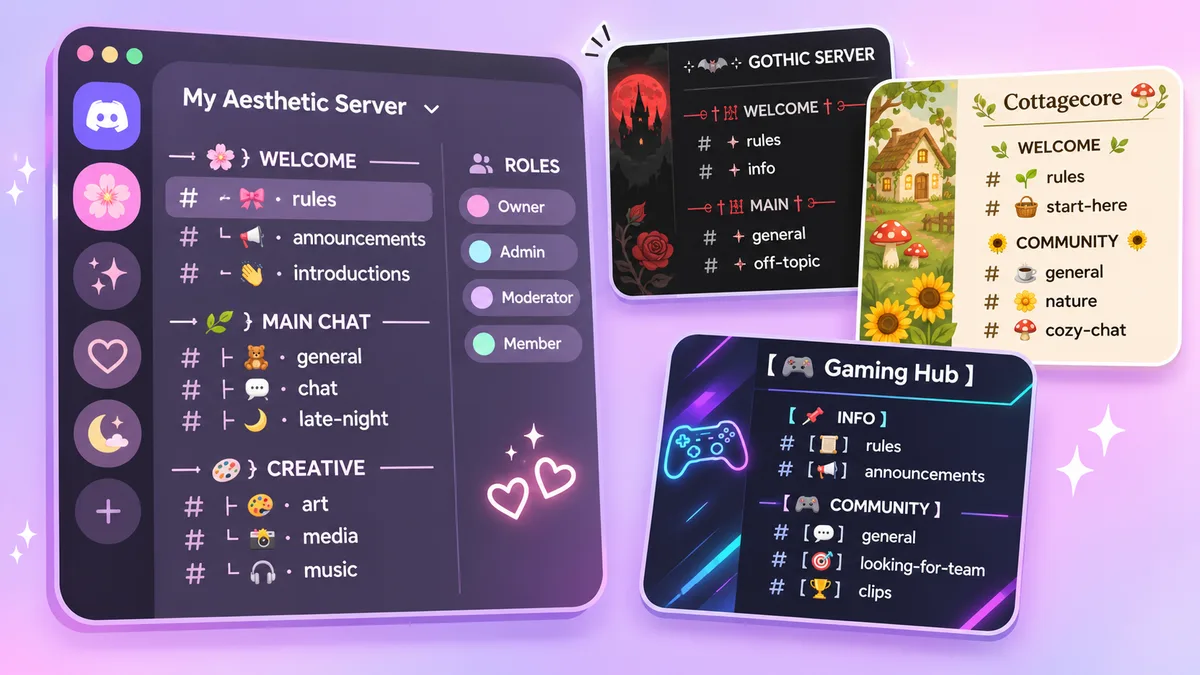
A great Discord server isn't just about who's in it. It's also about how it looks. A clean, aesthetic layout makes your server feel welcoming, helps new members find their way around, and gives your community a personality from the very first click.
In this guide, you'll find 8 ready-to-copy aesthetic server layouts, each with category names, channel names and role ideas. You'll also learn how to style channel names with symbols, pick role colors that match, and set everything up step by step.
Quick tip: Want to turn any channel or role name into a fancy font? Paste it into our Discord Fonts generator and copy the style you like.
What Makes a Discord Server Look Aesthetic?
An aesthetic server follows a few simple rules:
- One clear theme. Pastel, dark, cottagecore or space: pick one mood and stick to it.
- Matching symbols. Use the same divider and emoji style in every channel name.
- Organized categories. Group channels into sections like Info, Chat, Media and Voice.
- Coordinated role colors. Choose 4–6 colors from the same palette instead of random bright ones.
- Readable names. Decoration should frame the channel name, not hide it.
How to Style Aesthetic Channel Names
Most aesthetic channel names follow the same pattern:
[symbol or emoji] + [divider] + [channel name]
Here are popular formats you can copy. Tap one to copy it:
Common dividers:
Good to know: Discord turns spaces in text channel names into dashes and makes them lowercase, so use dividers like ・ or ﹒ instead of spaces. Voice channels allow spaces and capital letters, so you have more freedom there. Categories allow spaces too, but Discord always shows them in capital letters.
Find hundreds more decorations on our Discord Symbols page.
8 Aesthetic Discord Server Layouts to Copy
Tap any category, channel or role to copy it, or tap a color to copy its hex code. Need a name for the server itself? Browse our Discord server name ideas.
1. Soft Pastel Layout 🌸
Perfect for friend groups, art servers and chill communities.
Role ideas
Role colors
2. Dark Gothic Layout 🖤
Ideal for gaming groups, alt communities and night owls.
Role ideas
Role colors
3. Cottagecore Layout 🌿
Great for cozy communities, book clubs and plant lovers.
Role ideas
Role colors
4. Gaming Layout 🎮
Built for clans, esports teams and gaming communities.
Role ideas
Role colors
5. Anime Layout 🍥
Perfect for anime fans, manga readers and cosplay groups.
Role ideas
Role colors
6. Minimalist Layout ✦
Clean and simple. Great for study groups, work teams and creators.
Role ideas
Role colors
7. Celestial / Space Layout 🌙
A dreamy theme for night owls, astrology fans and chill hangouts.
Role ideas
Role colors
8. Kawaii Layout 🍡
Super cute and colorful. Perfect for younger communities and fun friend groups.
Role ideas
Role colors
How to Set Up Your Aesthetic Server (Step by Step)
- Pick a theme. Choose one of the layouts above, or mix ideas to create your own.
- Create categories. Click your server name at the top left, choose Create Category, and paste a category name.
- Add channels. Click the + next to a category, select Text or Voice, and paste the channel name.
- Create roles. Open Server Settings → Roles → Create Role, paste a role name, and enter the hex color code.
- Set an icon and banner. Match your server icon and banner to your theme's colors.
- Write a welcome message. Use the template below in your welcome or rules channel.
- Test it as a member. Use View Server As Role in the role settings to check how new members see your server.
Aesthetic Welcome Message Template
Copy this into your welcome channel and edit the text in [brackets]:
After pasting, retype each #channel and pick it from the list that pops up, so it becomes a clickable link to your decorated channel.
This uses Discord's header (#) and subtext (-#) formatting. Learn more in our Discord Big Text and Discord Text Formatting guides.
Tips for a Clean Aesthetic Layout
- Stay consistent. Use the same divider style in every channel. Mixing ┊, ・ and 『』 looks messy.
- Keep names short. One emoji, one divider and one or two words is the sweet spot.
- Don't use too many channels. Fifteen well-organized channels beat forty empty ones.
- Keep names searchable. Members can't easily search for channels written entirely in fancy fonts, so keep the main word in normal letters.
- Think about accessibility. Screen readers may read decorative symbols out loud, so don't overload names with them.
- Test on mobile. Some symbols look different on phones, so check your server on the mobile app before you finish.
Frequently Asked Questions
How do I make my Discord server look aesthetic?
Pick one theme, use matching emojis and dividers in every channel name, organize channels into clear categories, and choose role colors from the same palette.
How do I add symbols to Discord channel names?
Copy a symbol, such as ・ or ꒰ ꒱, and paste it into the channel name when you create or edit the channel. You can find more on our Discord Symbols page.
Why does Discord add dashes to my channel names?
Discord replaces spaces in text channel names with dashes. Use dividers like ・ or ﹒ instead of spaces to keep your names looking clean.
Can I use fancy fonts in Discord channel names?
Yes. Paste Unicode text from a font generator into your channel name. Keep the main word readable so members can still find the channel.
How many roles should an aesthetic server have?
Most servers look best with 4–8 main roles in matching colors, plus optional reaction roles for things like pronouns, games or interests.
Related Tools
- Discord Fonts Generator: fancy fonts for channel, role and server names
- Discord Server Names: cool, cute and aesthetic name ideas
- Discord Symbols: dividers, hearts, stars and more
- Discord Big Text: headers, emoji letters and banners
- Discord Bio Ideas: About Me bios to match your server