
Skip to content
DiscordFonts

Discord FontsCopy and Paste Discord Fonts

Turn ordinary text into eye-catching Discord styles. Explore 220+ unique fonts, including bold, cursive, gothic, aesthetic, and glitch text. Copy your favorite style instantly and make your Discord profile unforgettable.

  • 220+ Font Styles
  • Instant Copy
  • 100% Free

Updates as you type. Click any result to copy it.0 chars

224 styles

  • Bold Script

    𝓨𝓸𝓾𝓻 𝓣𝓮𝔁𝓽 𝓗𝓮𝓻𝓮

  • Star Wings

    ★彡 𝓨𝓸𝓾𝓻 𝓣𝓮𝔁𝓽 𝓗𝓮𝓻𝓮 彡★

  • Royal Frame

    ꧁ 𝔜𝔬𝔲𝔯 𝔗𝔢𝔵𝔱 ℌ𝔢𝔯𝔢 ꧂

  • Gamer Tag

    亗 𝙔𝙤𝙪𝙧 𝙏𝙚𝙭𝙩 𝙃𝙚𝙧𝙚 亗

  • Bold Gothic

    𝖄𝖔𝖚𝖗 𝕿𝖊𝖝𝖙 𝕳𝖊𝖗𝖊

  • Crowned

    ♛ 𝖄𝖔𝖚𝖗 𝕿𝖊𝖝𝖙 𝕳𝖊𝖗𝖊 ♛

  • Bold

    𝐘𝐨𝐮𝐫 𝐓𝐞𝐱𝐭 𝐇𝐞𝐫𝐞

  • Kawaii

    ꒰ 𝑌𝑜𝑢𝑟 𝑇𝑒𝑥𝑡 𝐻𝑒𝑟𝑒 ꒱

  • Sparkles· 32+

    ✧・゚: *✧・゚:* 𝒴ℴ𝓊𝓇 𝒯ℯ𝓍𝓉 ℋℯ𝓇ℯ *:・゚✧*:・゚✧

  • Boss Stars

    ╰☆☆ 🆈🅾︎🆄🆁 🆃🅴🆇🆃 🅷🅴🆁🅴 ☆☆╮

  • Sniper

    ▄︻デ══━一 🔥 𝔜𝔬𝔲𝔯 𝔗𝔢𝔵𝔱 ℌ𝔢𝔯𝔢 🔥

  • Devil Kiss

    😈🖤💋 𝓨𝓸𝓾𝓻 𝓣𝓮𝔁𝓽 𝓗𝓮𝓻𝓮 💋🖤😈

  • Script Cursive

    𝒴ℴ𝓊𝓇 𝒯ℯ𝓍𝓉 ℋℯ𝓇ℯ

  • Gothic Fraktur

    𝔜𝔬𝔲𝔯 𝔗𝔢𝔵𝔱 ℌ𝔢𝔯𝔢

  • Gothic Cross

    ꧁༒☬ 𝖄𝖔𝖚𝖗 𝕿𝖊𝖝𝖙 𝕳𝖊𝖗𝖊 ☬༒꧂

  • Kiss Lips

    💋 𝖄𝖔𝖚𝖗 𝕿𝖊𝖝𝖙 𝕳𝖊𝖗𝖊 💋

  • Beast Mode

    🏋️🔥 𝓨𝓸𝓾𝓻 𝓣𝓮𝔁𝓽 𝓗𝓮𝓻𝓮 🔥🏋️

  • Ribbon Blossom

    🎀🌸 𝑌𝑜𝑢𝑟 𝑇𝑒𝑥𝑡 𝐻𝑒𝑟𝑒 🌸🎀

Random Discord Font Styles

Every letter gets a different style. Generate as many as you like.

  • Random 1

    『 𝖄ᴏ𝑢𝕣 ㄒ𝖊𝑥ㄒ 𝐻𝐞𝑟𝑒 』

  • Random 2

    ⚡ ყơ𝑢尺 Ťéẍⓣ ĤEɾ𝖊 ⚡

  • Random 3

    ꧁ 𝖄𝖔𝑢ⓡ 𝐓ҽҳť 卄éɾ𝖊 ꧂

  • Random 4

    •´¯`•. ყ𝗼ᴜʀ 𝕋Ɇx𝓉 ɧ𝕖𝑟𝑒 .•´¯`•

  • Random 5

    𝕐ó𝐮𝓇 𝐓Ɇ𝓍ㄒ Ħ𝗲𝗿ҽ

  • Random 6

    𝖄O𝓊𝗿 𝒯𝐞𝖝T ℍɛɍɛ

  • Random 7

    ⚡ 𝐘𝑜ᴜɍ 𝐓𝐞𝖝𝐭 ℍᴇʀɇ ⚡

  • Random 8

    ıllıllı Ⓨơ𝑢𝕣 Ŧⓔӿᴛ ɧ𝖊ཞℯ ıllıllı

  • Random 9

    彡 ყㄖ𝑢ɍ Ⓣɇ𝕩ŧ ԋɇɾᴇ 彡

  • Random 10

    •´¯`•. ⓎØ𝘂ཞ ㄒɇ𝘅𝕥 𝐇ⓔ𝐫E .•´¯`•

  • Random 11

    🌸 ʏσʉཞ ₮𝗲𝓍ㄒ 𝐇éʀҽ 🌸

  • Random 12

    Ɏ𝑜𝑢𝑟 𝑇ɇ乂ť 𝐻EཞE

Discord Text Formatting Helper

Bold, spoilers, headers and colored text use Discord’s built-in markdown. Type once and copy the syntax, or read the full formatting guide. For event times and countdowns, try the timestamp generator.

  • Bold**text**

  • Italic*text*

  • Bold Italic***text***

  • Underline__text__

  • Strikethrough~~text~~

  • Spoiler||text||

  • Inline Code`text`

  • Code Block```text```

  • Quote> text

  • Big Header# text

  • Medium Header## text

  • Small Header### text

  • Subtext-# text

Colored text

Uses an ansi code block. Colors show on desktop and web, not in the mobile apps.

Text color

Focused generators for one look at a time, each with tips on where it works best.

More generators: Fancy Text Generator · Discord Name Generator · Discord Timestamp Generator · Discord Username Generator · Small Text Generator · Discord Big Text · Number Fonts · Discord Symbols · Discord Server Names · Discord Status Ideas · Discord Bio Ideas · Invisible Text Generator

Social Media Fonts

Fancy text generators made for each app, with tips on what works in names, bios and posts.

Gaming Fonts

Stylish name generators for your favourite games, with each game's name rules explained.

From the Blog

Step-by-step guides for fancy fonts, colored text and better Discord names. See all posts.

What Are Discord Fonts and How Do They Work?

Discord fonts are not fonts in the usual sense. Discord does not let you choose a typeface for your name or messages, so a Discord font generator uses a clever workaround: it swaps each ordinary letter for a look-alike character from Unicode, the global standard that gives every character on every device a number. Unicode includes complete alphabets that were added for math, science and other scripts, such as 𝐛𝐨𝐥𝐝, 𝓈𝒸𝓇𝒾𝓅𝓉, 𝔤𝔬𝔱𝔥𝔦𝔠 and ᴛɪɴʏ ᴄᴀᴘꜱ letters.

Because these are characters rather than a font file, the styling travels with the text. When you paste 𝐃𝐢𝐬𝐜𝐨𝐫𝐝 into a nickname, everyone in the server sees the bold version without installing anything. The same trick works almost anywhere text is accepted, which is why these styles are also called fancy text or copy-and-paste fonts.
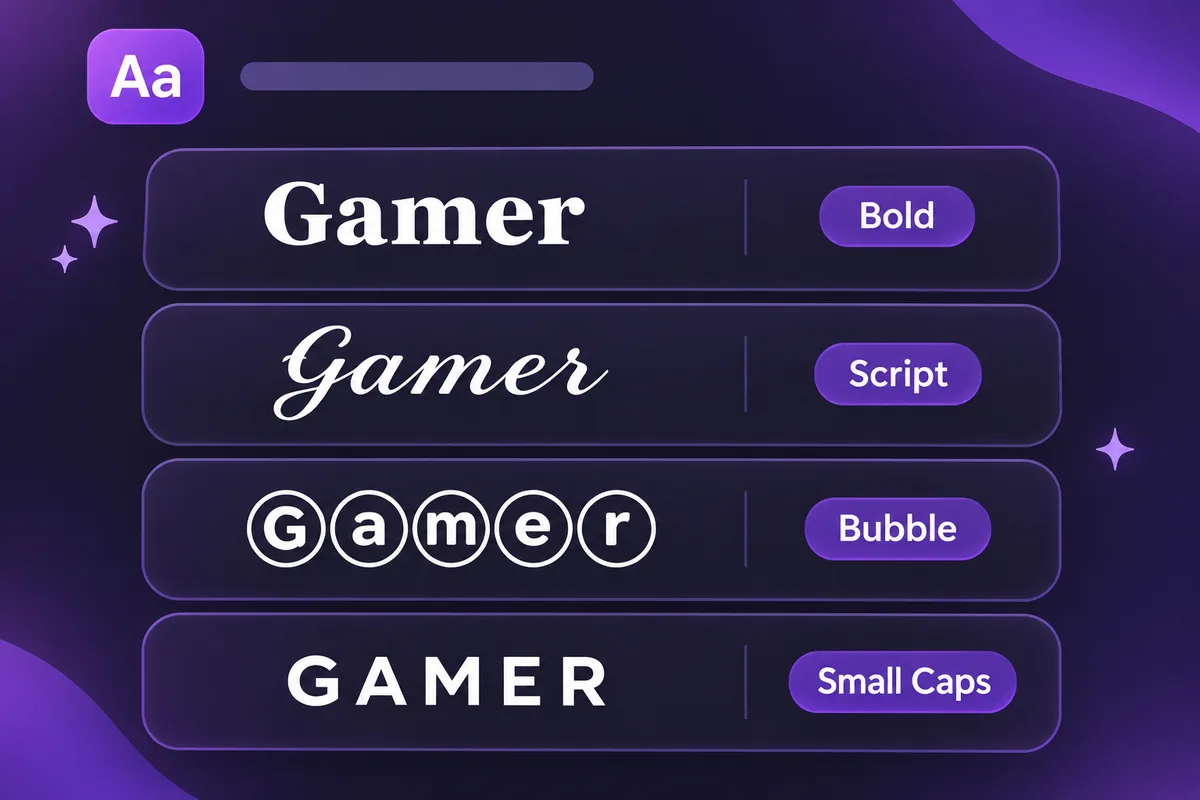
Discord font styles compared: the word Gamer in bold, script, bubble and small caps letters
The same word in four Discord font styles, all made from standard Unicode characters.

How to Use the Discord Font Generator

  1. Type your text in the box at the top of the page. Every style updates instantly as you type.
  2. Browse the styles or use the filter buttons (Bold, Cursive, Gothic, Decorative, Aesthetic and Glitch) to narrow the list. Tap Show more styles to see every option.
  3. Check the length if it’s for a name. Styles that go over Discord’s 32-character name limit are marked with 32+.
  4. Click Copy (or the styled text itself). A “Copied!” message confirms it is on your clipboard.
  5. Paste it into Discord with Ctrl+V, Cmd+V or a long press on mobile, then save.
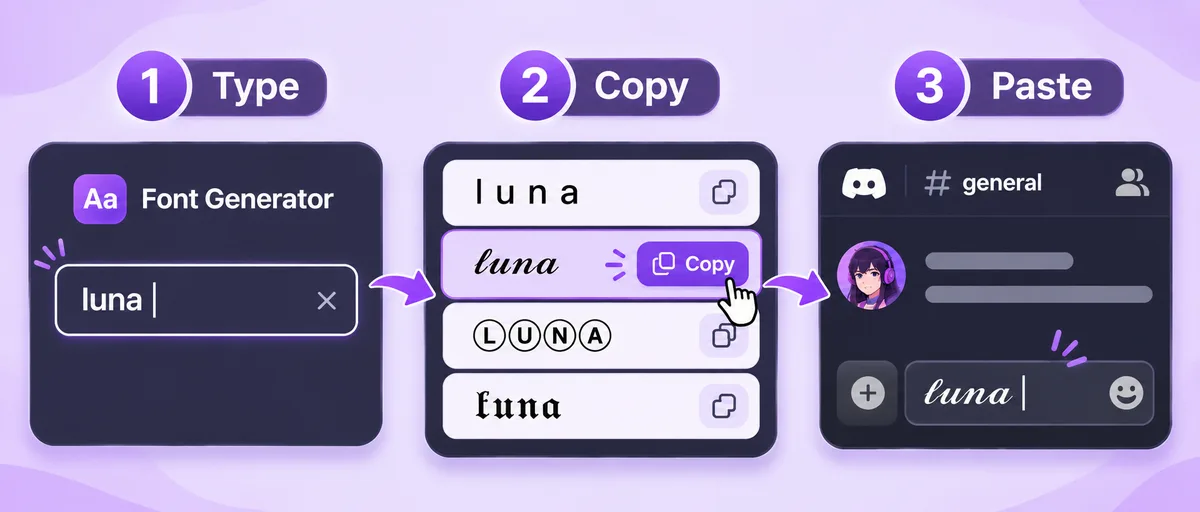
How to use the Discord font generator in 3 steps: type your text, copy a fancy style, paste it into Discord
Type, copy and paste: that's all it takes.

How to Change Your Discord Name Font, Nickname or Server Name

Discord menus move around from time to time, so the labels below may differ slightly in your version of the app, but the fields themselves stay the same.
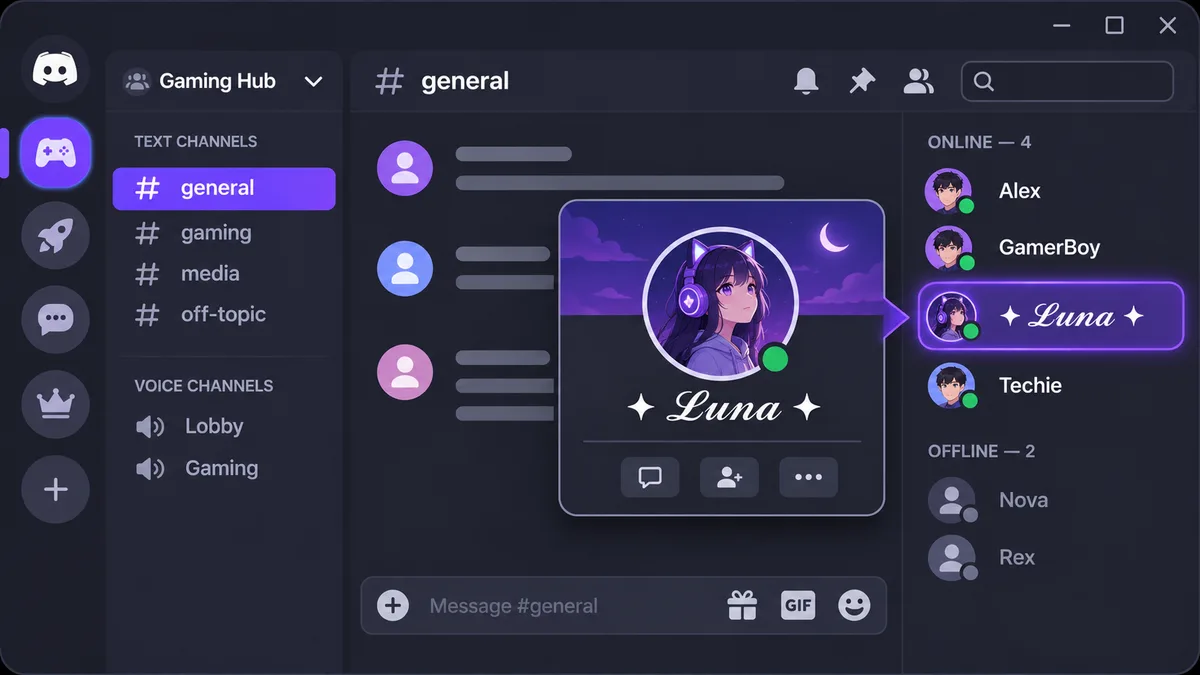
Fancy font name on Discord: the cursive name Luna with star symbols in the member list and profile card
A styled name shows up for everyone in the member list and on your profile card.

Display name

Your display name is shown next to your messages in every server. Open User Settings, go to the profile section, paste your styled text into Display Name and save. Display names can be up to 32 characters. To preview name fonts at the size they appear in chat, use the Discord name font generator.

Server nickname

To use a different Discord font in just one server, open that server’s menu, choose the option to edit your server profile, and paste into Nickname. Some servers stop members from changing nicknames, in which case you will need to ask a moderator.

Server and channel names

If you own or manage a server, paste styled text into the server name in Server Settings, or edit a channel and paste into its name. Fancy channel names such as “︱𝐠𝐞𝐧𝐞𝐫𝐚𝐥” are a popular way to make a server look organized. Keep important channels readable so new members can find their way around.

About Me and messages

Your About Me bio and normal messages accept everything on this page, including longer decorated styles and emoji wrappers, so they are the best place for experimental text.

Best Discord Fonts for Usernames, Bios and Servers

The right Discord font depends on where people will see it:

WhereGood choicesWhy
Display name and nicknameBold, Bold Script, Small CapsReadable at small sizes and supported on nearly every device.
About Me bioAesthetic, Sparkles, Kawaii wrappersMore room for decoration, and readability matters less than in a name.
Server nameGothic, Double-Struck, Royal FrameA strong title style gives a server a clear theme.
Channel namesSmall Caps, Bold Sans, MonospaceCompact styles that keep the channel list tidy.
Messages and memesGlitch, Upside Down, BubbleEye-catching for jokes and announcements, but use them sparingly.

A good rule is that anything people need to read quickly, like a name they want to @mention, should use a clean style. Save heavy decoration for places where it is purely for fun.

Discord Text Formatting (Markdown) Explained

Discord also has built-in formatting called markdown. Instead of special characters, you wrap text in symbols and Discord styles it for you: **bold**, *italic*, __underline__, ~~strikethrough~~ and ||spoiler||. You can also start a line with # for a header, -# for small subtext or > for a quote, and use code blocks for monospace or even colored text.

Markdown only works in messages (and a few profile fields). It does nothing in names, which is exactly why Unicode Discord fonts exist. Try both with the formatting tool above, or read the full Discord text formatting guide.

Why Some Discord Font Styles Show as Boxes

If someone sees empty rectangles (sometimes called “tofu”) or question marks instead of your text, their device does not have a font that contains those characters. Nothing is wrong with the text itself; it is a display limitation on that particular screen. A few practical notes:

  • Bold, italic, script, gothic and double-struck letters are supported by current versions of Windows, macOS, iOS and Android.
  • Squared, dark bubble, hieroglyph and some upside-down letters are newer additions and are the most likely to break on older phones, smart TVs and game consoles.
  • Combining-mark styles such as strikethrough, underline and zalgo depend on how each device stacks marks, so they can look misaligned.
  • Styles with a Limited support badge in the generator are the riskiest. Hover over or tap the badge for details.

Accessibility: Screen Readers and Fancy Unicode

Fancy text looks like letters, but to software it is a string of mathematical or decorative symbols. Many screen readers announce each character by its technical name (for example “mathematical bold capital D”) or skip it entirely, and search tools may not match it. That can make your name hard to find and hard to follow for people who rely on assistive technology.

Use Discord fonts for decoration, not information. Keep rules, announcements and anything important in plain text, and consider a clean style for your display name so others can mention and read it easily.

Updated · By the DiscordFonts team

Discord Font FAQ

What is a Discord font?

A Discord font is text made from special Unicode characters that look like bold, cursive, gothic or other lettering. Discord has no font picker, so you generate the styled characters here and paste them into Discord like any other text.

Can you change the font in Discord?

Not directly. Discord lets you change the app's text size and use markdown for bold, italic, headers and similar formatting in messages, but you cannot pick a different typeface. Unicode Discord fonts are the workaround: they are characters, not a font setting, so everyone sees them.

How do I use Discord fonts copy and paste?

Type your text in the box at the top of this page, find a style you like, and tap Copy (or tap the styled text itself). Then open Discord and paste it into your display name, server nickname, About Me, server name, channel name or a message.

Can I use a fancy Discord font in my username?

Not in your unique @username, which only accepts lowercase letters, numbers, underscores and periods. Fancy fonts work in your display name and per-server nicknames instead, and those are the names most people see in chat.

Why do some Discord fonts show as boxes or question marks?

A box means the device viewing the text has no font that contains that character. It usually happens with rare symbols on older phones and computers. Styles with a Limited support badge are the most likely to do this, so stick to bold, italic or script for names.

Do Discord fonts work on mobile?

Yes. You can copy and paste from this site on iPhone and Android, and most styles display correctly in the Discord mobile app. Colored ANSI text is the main exception: it currently only shows color on desktop and web.

What is the best Discord font for a name?

Bold, Bold Script, Small Caps and Double-Struck are the most popular because they stay readable and render on almost every device. Keep names under 32 characters, and avoid zalgo or heavy symbols so people can still mention you.

Is it against Discord's rules to use fancy fonts?

Using Unicode characters is not against the rules on its own. Problems start when a name is used to impersonate someone, evade moderation or be unreadable. Individual servers can also set their own nickname rules, so follow the moderators if they ask for a plain name.

Is this Discord font generator free and private?

Yes. The generator is free with no sign-up, and conversion happens entirely in your browser. The text you type is not sent to or stored on our server.